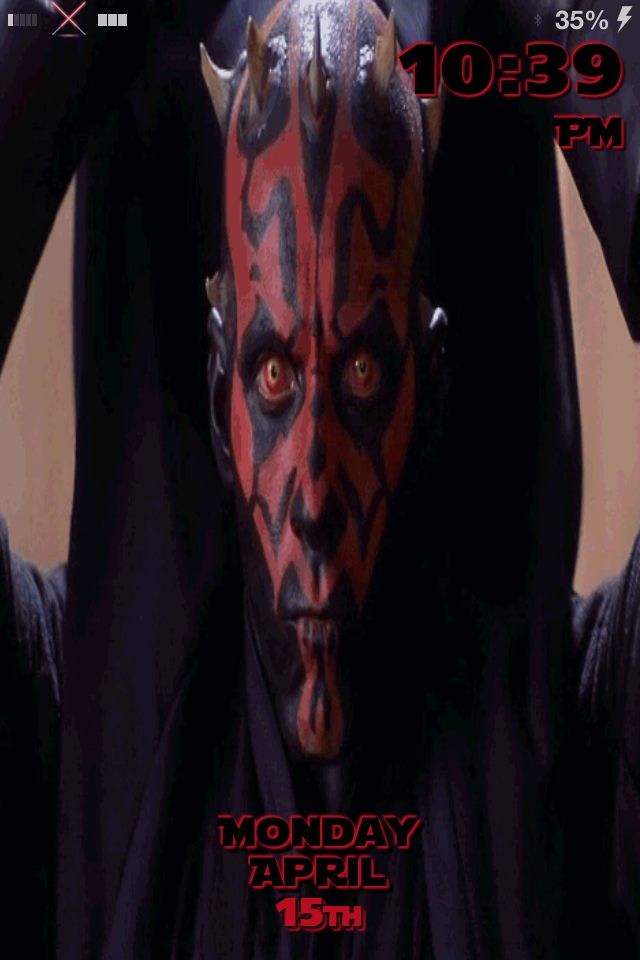
<p>Darth Maul GIF lockscreen for iPhone 5 w/ seperate GIF wallpaper. No unlock slider, just swipe the bottom of the screen to unlock. Zeppelin Darth Maul Saber logo folder and clear lockscreen notifications included.</p>
<p> </p>
<p>See it in action <a style="line-height: 1.4;" title="Watch it here!" href="http://youtu.be/_Vg6v2fE8bk">here</a>.</p>
<p> </p>
<p><em>Suggested free Cydia Tweaks to use with my lockscreens; Lockscreen Clock Hide, LiveWire, NoCameraGrabber, and NoLockNotificationsBG.</em></p>
<p> </p>
<p><strong>If you enjoy my work and would like to see more, please <a title="Paypal" href="https://www.paypal.com/cgi-bin/webscr?cmd=_s-xclick&hosted_button_id=DGLFERJ35XTLS">Donate</a>.</strong></p>
<p> </p>
<p>You can check out my other lockscreens <a title="Check them out here!" href="http://planet-iphones.com/cydia/author/wardever">here</a>, or by searching (WE) on Cydia.</p>
<p> </p>
<p>Thank you for all of the positive feedback and for your requests.</p>
<p> </p>
<p>Follow me on <a title="wardever" href="https://twitter.com/wardever">Twitter</a> and <a title="theiphonejailbreak" href="http://theiphonejailbreak.tumblr.com/">Tumblr</a> for updates, questions, tutorials and requests.</p>
<p> </p>
<p>If you do not know how to move the Zeppelin logo folder go <a title="tutorial" href="http://theiphonejailbreak.tumblr.com/post/44191263031/how-to-move-zeppelin-logo-from-lockscreen-folder-to">here</a> for a step by step tutorial.</p>
<p> </p>
<p>Feel free to contact me with any questions or feedback that you may have.</p>
<p> </p>
<p>-wardever</p>