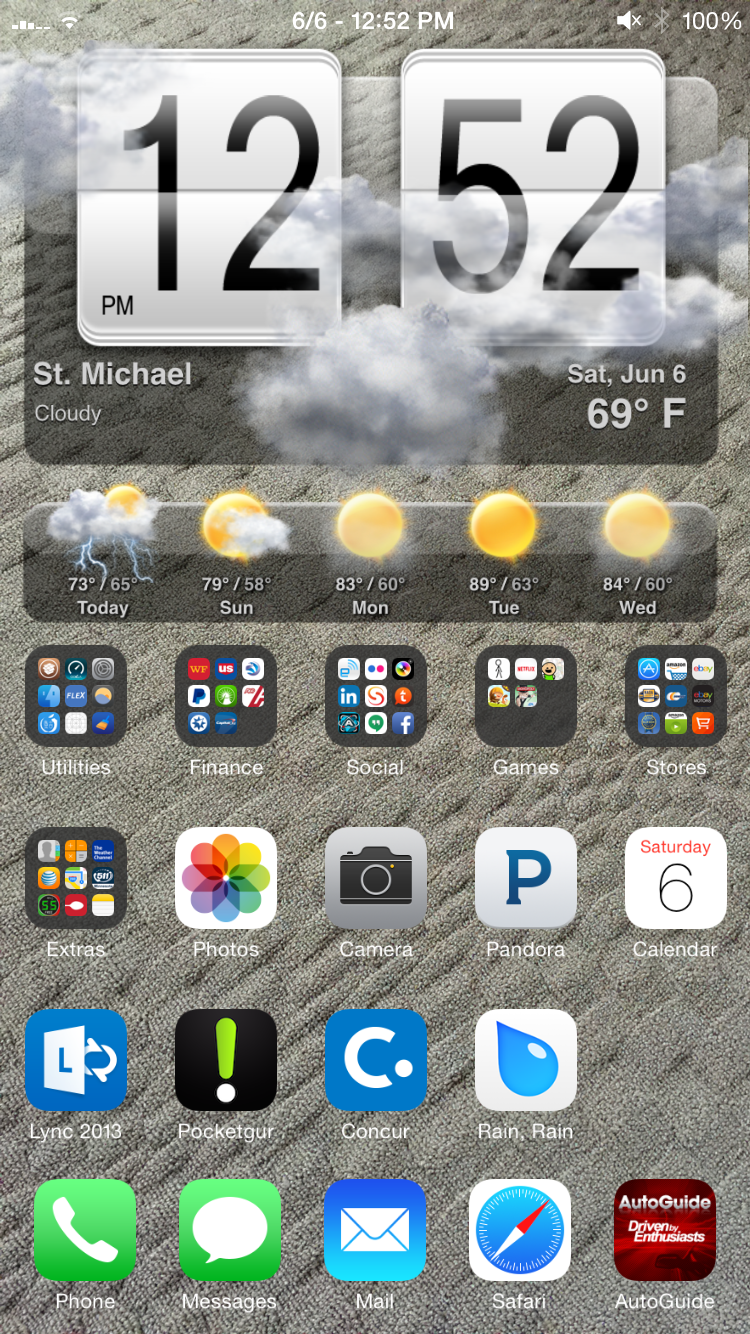
<p class="p1"><span style="font-family: 'courier new', courier; font-size: x-small;">HTC Sense Animated Weather clock and forecast iWidget for the iPhone 6 and 5.</span></p>
<p class="p1"><span style="font-family: 'courier new', courier; font-size: x-small;">Uses iWidget preferences for setup. </span></p>
<p class="p1"><span style="font-family: 'courier new', courier; font-size: x-small;">Many UI customizations available in preferences.</span></p>
<p class="p2"><span style="font-family: 'courier new', courier; font-size: x-small;"> </span></p>
<p class="p1"><span style="font-family: 'courier new', courier; font-size: x-small;">The location can now be set automatically based on your phone's IP address, this may be nice on WiFi but on cellular data it will likely be inaccurate.</span></p>
<p class="p1"><span style="font-family: 'courier new', courier; font-size: x-small;">You can use zip codes, or state/city or country/city specifications in the location field.</span></p>
<p class="p2"><span style="font-family: 'courier new', courier; font-size: x-small;"> </span></p>
<p class="p1"><span style="font-family: 'courier new', courier; font-size: x-small;">Examples:</span></p>
<p class="p1"><span style="font-family: 'courier new', courier; font-size: x-small;">uk/york</span></p>
<p class="p1"><span style="font-family: 'courier new', courier; font-size: x-small;">ireland/cork</span></p>
<p class="p1"><span style="font-family: 'courier new', courier; font-size: x-small;">tx/dallas</span></p>
<p class="p1"><span style="font-family: 'courier new', courier; font-size: x-small;">55362</span></p>
<p class="p2"><span style="font-family: 'courier new', courier; font-size: x-small;"> </span></p>
<p class="p2"><span style="font-family: 'courier new', courier; font-size: x-small;"> </span></p>
<p class="p1"><span style="font-family: 'courier new', courier; font-size: x-small;">DOES NOT USE YAHOO WEATHER ANYMORE!</span></p>
<p class="p2"><span style="font-family: 'courier new', courier; font-size: x-small;"> </span></p>
<p class="p1"><span style="font-family: 'courier new', courier; font-size: x-small;">To use this you need to enter your personal API key in the addon settings.</span></p>
<p class="p1"><span style="font-family: 'courier new', courier; font-size: x-small;">To get a free API key:</span></p>
<p class="p3"><span class="s1" style="font-family: 'courier new', courier; font-size: x-small;">1) please sign-up here: <a href="http://www.wunderground.com/weather/api/d/login.html"><span class="s2">http://www.wunderground.com/weather/api/d/login.html</span></a></span></p>
<p class="p1"><span style="font-family: 'courier new', courier; font-size: x-small;">2) click on the activation link in the confirmation email</span></p>
<p class="p1"><span style="font-family: 'courier new', courier; font-size: x-small;">3) log in to your account</span></p>
<p class="p3"><span class="s1" style="font-family: 'courier new', courier; font-size: x-small;">4) go to: <a href="http://www.wunderground.com/weather/api/"><span class="s2">http://www.wunderground.com/weather/api/</span></a></span></p>
<p class="p1"><span style="font-family: 'courier new', courier; font-size: x-small;">5) select 'Explore my options'</span></p>
<p class="p1"><span style="font-family: 'courier new', courier; font-size: x-small;">6) on the next page, select 'Anvil Plan' or 'Cumulus Plan' and 'Drizzle' and click 'Purchase Key' (should be free)</span></p>
<p class="p1"><span style="font-family: 'courier new', courier; font-size: x-small;">7) fill in the registration form (doesn't really mater what info you supply here)</span></p>
<p class="p1"><span style="font-family: 'courier new', courier; font-size: x-small;">8) on the next page, find your 'Key ID'</span></p>
<p class="p1"><br /><span style="font-family: 'courier new', courier; font-size: x-small;"> - iOS9 compatible iPhone 6 (4.7" screen) by default</span></p>
<p class="p1"><span style="font-family: 'courier new', courier; font-size: x-small;">- iPhone 5 (4" screen) compatible via scale option (probably 80%)</span></p>
<p class="p1"><span style="font-family: 'courier new', courier; font-size: x-small;">- iPhone 6+ (5.5" screen) compatible via other release.</span></p>
<p class="p2"><span style="font-family: 'courier new', courier; font-size: x-small;"> </span></p>
<p class="p1"><span style="font-family: 'courier new', courier; font-size: x-small;">Use Anchor to place icons where you want them</span></p>
<p class="p1"><span style="font-family: 'courier new', courier; font-size: x-small;"> </span></p>
<p class="p1"><span style="font-family: 'courier new', courier; font-size: x-small;">This should also be compatible with LockHTML - You may need to edit the advanced widget location inside of LockHTML and change the "Y" axis coordinate to a value of +20 to move it out from under the top of the status bar. </span></p>
<p class="p1"><span style="font-family: 'courier new', courier; font-size: x-small;">Borrowed the code updates from the SBHTML version to allow resize </span></p>