<div>
<p>When the <strong>Flatness</strong> meet The <strong>Skeuomorphism</strong>!</p>
<p> </p>
<p>It is Pronounced “ <strong>Layos</strong> ".</p>
<p> </p>
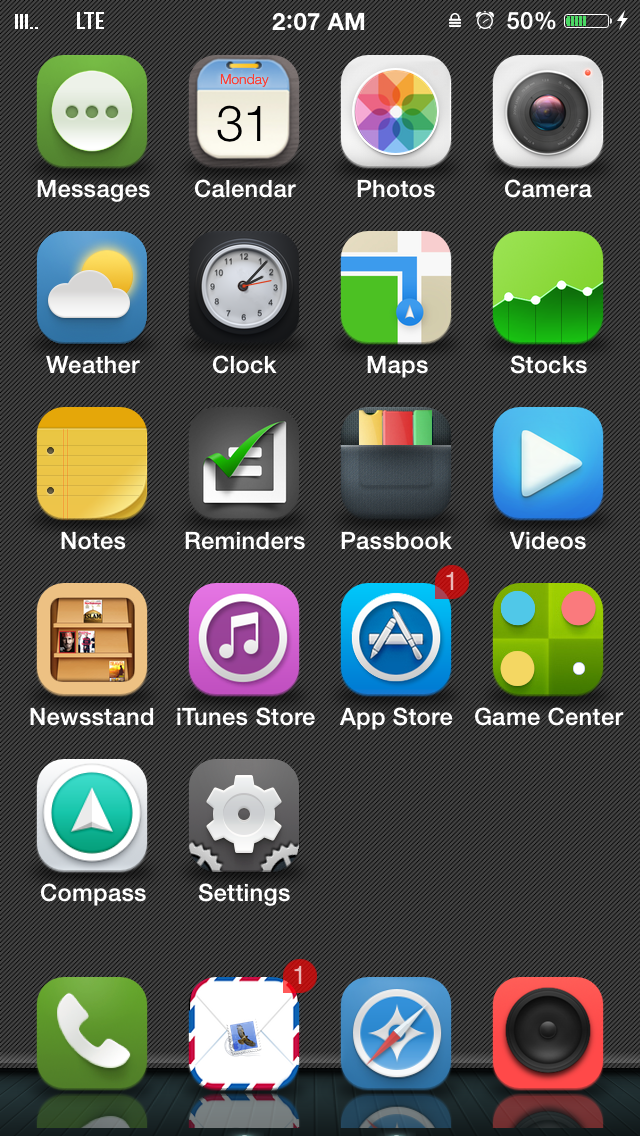
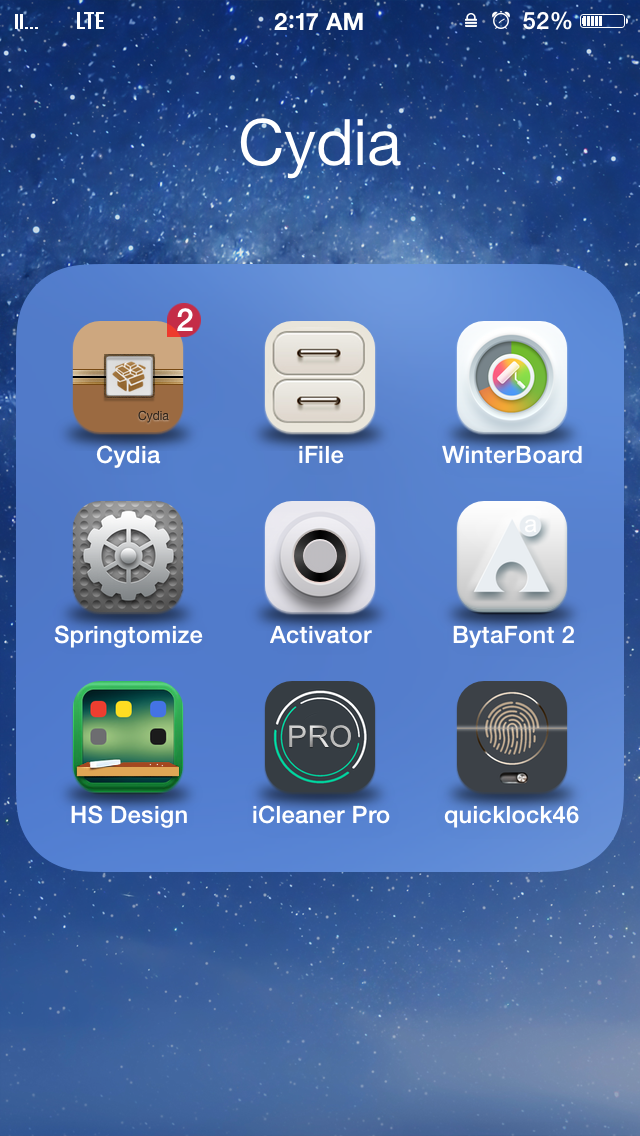
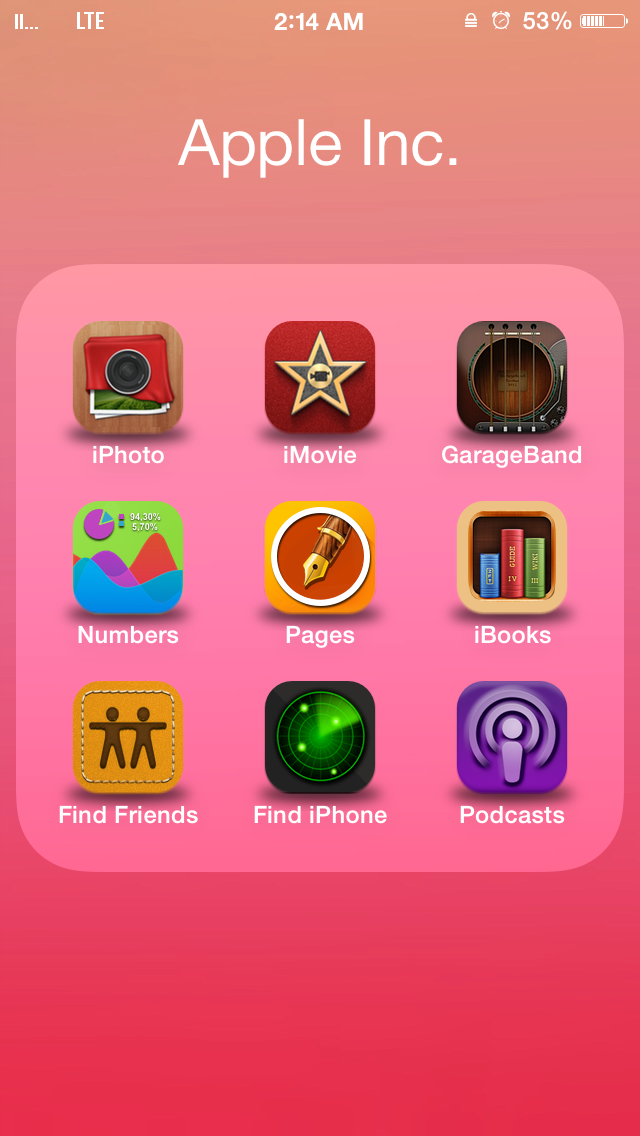
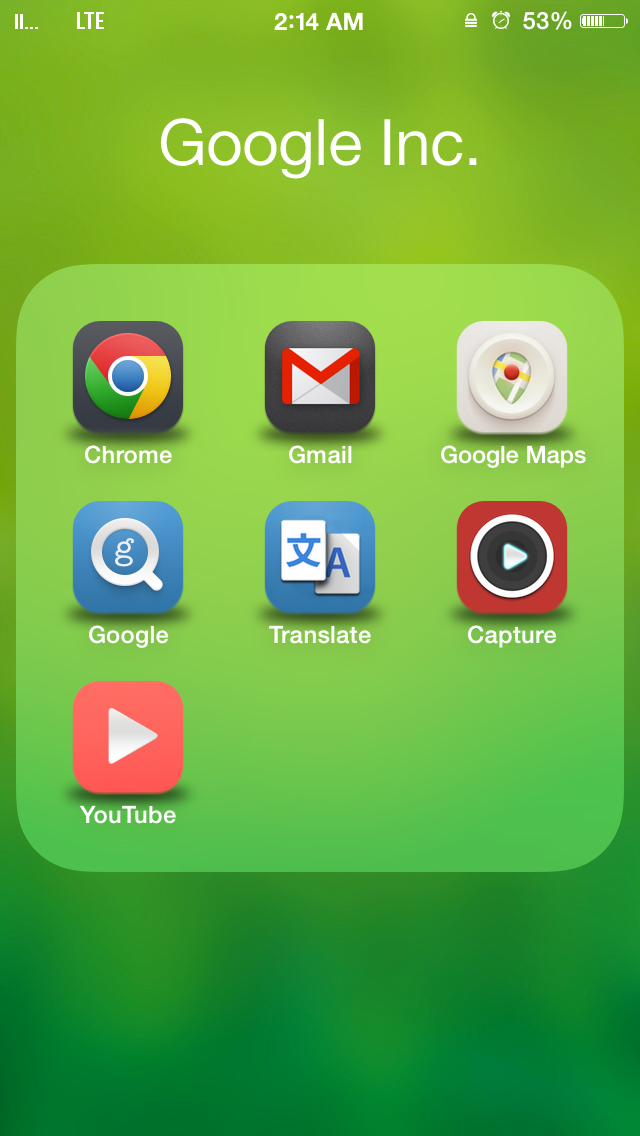
<p><strong>LAIUS</strong> theme is an interesting mix of Flat and Skuemorphism, it will complete The awesomeness !</p>
<p> </p>
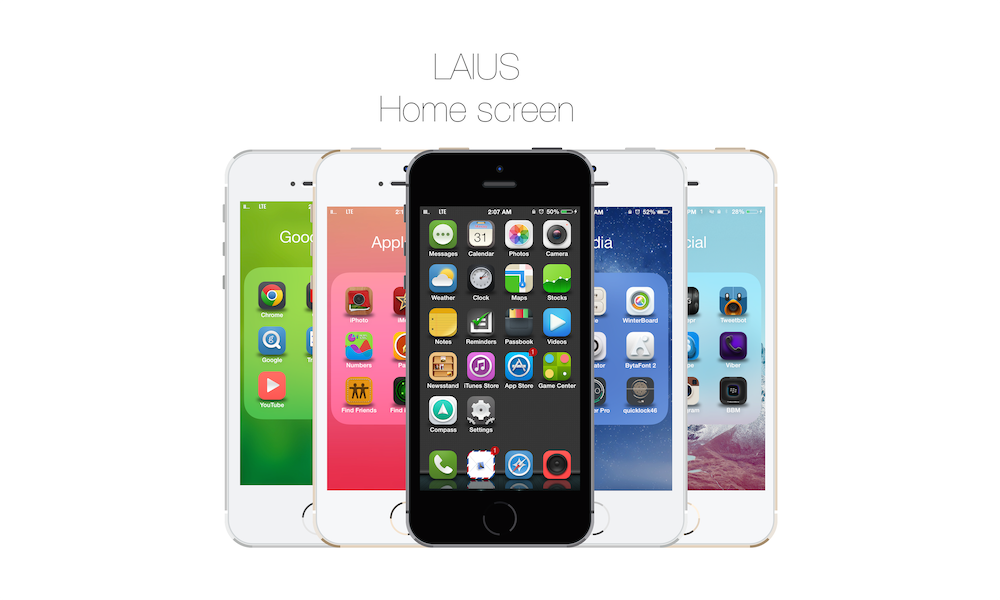
<p>I love when the Product presents itself, so I'll leave you here with the main informations then you can see the Screenshots .</p>
<p> </p>
<p><strong>Compatible</strong> :</p>
<p> </p>
<p>IOS : 7 and 8</p>
<p>iPhone : 4 , 4s , 5 , 5s , 6 and 6 Plus</p>
</div>
<div> </div>
<div>Main informations for the LAIUS theme :-</div>
<div> </div>
<div><strong>1-</strong> 150+ icons </div>
<div> </div>
<div><strong>2-</strong> Icons support “ Spotlight , settings , Notifications center, Alerts and Multitasking.</div>
<div> </div>
<div>
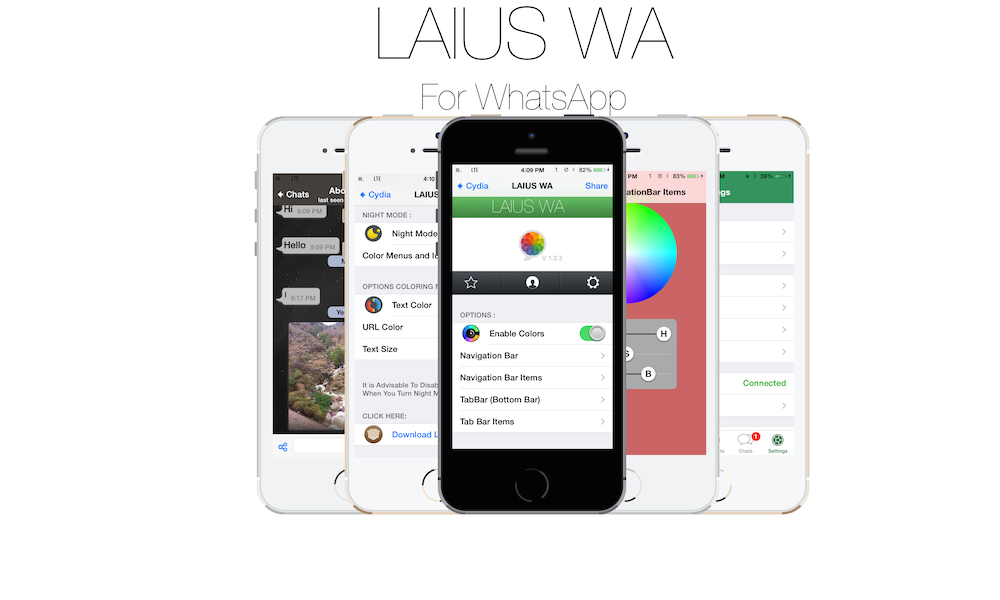
<div><strong>3-</strong> The good news here are the ( LIAUS WA ) this tweak comes for free with the main theme and you can find it in the settings App, This tweak will allow you to have a control of the UI of your WhatsApp .</div>
<div> </div>
<div>(( MUST SEE THE SCREENSHOTS ))</div>
</div>
<div> </div>
<div><strong>4-</strong> Statusbar icons and there is another option for IOS 6 statusbar just if you missed the old style.</div>
<div> </div>
<div><strong>5-</strong> Sounds for Keyboard and Camera ! ( Work with third party apps )</div>
<div> </div>
<div><strong>6-</strong> New Glyph and user interface for " Safari , Appstore, Cydia, Photos, Calculator, Clock, Settings, Notes, Messages, Mail, WhatsApp, Twitter " and much more Apps and Tweaks like Auxo 2 and Intelliscreen X.</div>
<div> </div>
<div><strong>7-</strong> New glyph and icons for Lockscreen, Notification center, Badges and keyboard.</div>
<div> </div>
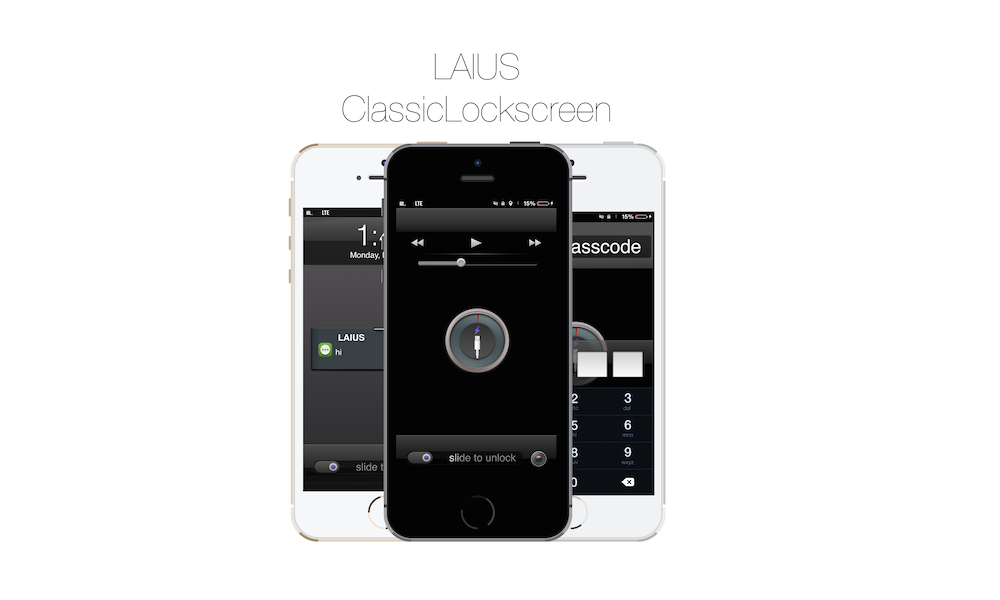
<div><strong>8-</strong> Support for ClassicLockscreen See it in the screenshots section.</div>
<div> </div>
<div><strong>9-</strong> Support for ClassicDock ( 2 new Docks ) and Classic Badge ( 2 new badges style )</div>
<div> </div>
<div> </div>
<div> </div>
<div> </div>
<div>What you’ll find in the WinterBoard :- </div>
<div> </div>
<div> </div>
<p><strong>1-</strong> LAIUS : It is for icons and user interface.</p>
<div><br />
<div><strong>2-</strong> LAIUS ( Shadow Mask ) : Place at the top to have a new shadow mask for all your apps.</div>
<div> </div>
<div><strong>3-</strong> LAIUS ( WhatsApp Night mode ) : This will change your whatsApp UI to a dark mode, for best results you can use the settings in the settings app inside ( LAIUS ) option , it tweak comes automatically with the main theme ( SEE THE SCREENSHOTS ) ! And you can find it in the cydia store “ LAIUS WA “.</div>
<div> </div>
<div><strong>4-</strong> LAIUS ( WhatsApp IOS 6 UI ) : If you missed the old style apply it. </div>
<div> </div>
<div><strong>5-</strong> LAIUS ( IOS 6 statusbar ) : Place it at the top in the Winterboard to have the old statusbar icons style.</div>
<div> </div>
<div>
<div><strong>6-</strong> LAIUS ( alt Settings icons ) : Place it at the top in the Winterboard</div>
<div> to have alternative icons for the Settings App .</div>
</div>
<div> </div>
<div><strong>7-</strong> LAIUS ( Double line CC ) : New mask for Control Center.</div>
<div> </div>
<div><strong>8-</strong> LAIUS ( ClassicLockScreen ) : You have to install “ClassicLockScreen” tweak first to use this theme ( SEE THE SCREENSHOTS ) !</div>
<div> </div>
<div>Note : Not For iPhone 6 Plus users</div>
<div><br /><strong>9-</strong> LAIUS ( Red ClassicDock ) & ( Special ClassicDock ) : These themes need to install “ ClassicDock” tweak first then apply one of them in the Winterboard. </div>
<div> </div>
<div>Note : Not For iPhone 6 Plus users</div>
<div> </div>
<div><strong>10-</strong> LAIUS ( ClassicBade ) & ( Flat ClassicBadge ) : These themes need to install “ Classic Badge “ first then apple one of them in the winterboard.</div>
<div> </div>
<div>11- LAIUS ( statusbar ) : This option for statusbar icons</div>
<div>12- LAIUS ( Sounds ) : To have a new Keyboard and Camera Capture sounds</div>
<div>13- LAIUS ( alt icons ) : It has an alternative icons, it supports now these icons " Appstore, Camera, Facetime, Calendar and Gregorian calendar, Mail, Note, Phone, Safari, Photos, Message, Musi, Settings, Clock, Twitter, Facebook, Blackberry and " WhatsApp with new UI".<br /><br /><br />So now we have ( <strong>15</strong> ) options inside the WinterBoard, and much more are coming :)</div>
</div>
<p> </p>
<p> </p>
<p>If you have any questions, ideas, icons for new apps request or even to say Hi ;) </p>
<p>just mention on twitter / or / send me an email</p>
<p> </p>
<p> </p>
<p>Twitter : @salehyas</p>
<p>Twitter : @ConerTheme</p>
<p> </p>
<p>Thanks To @Salehyas For his help and support !</p>
<p> </p>
<p>I am happy when you support developers, it is just a few coins but it is a big deal for us, Thank you so much :-) </p>