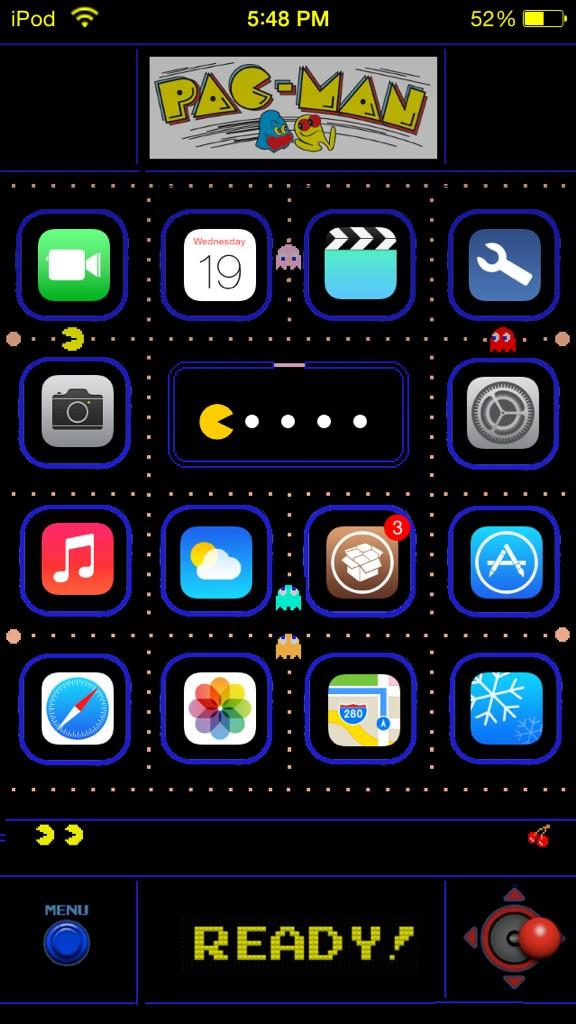
<p style="text-align: center;"> </p>
<p style="text-align: center;"><span style="text-decoration: underline;"><span style="font-size: large;"><strong><span style="color: #ffcc00;"><span style="font-size: large;"><strong><span style="color: #ffcc00;"><span style="font-size: large;"><strong><span style="color: #ffcc00;"><span style="font-size: large;"><strong><span style="color: #ffcc00;"><span style="font-size: large;"><strong><span style="color: #ffcc00;"><span style="font-size: large;"><strong><span style="color: #ffcc00; text-decoration: underline;"><img src="http://i.imgur.com/wevLgHw.png" alt="" width="96" height="101" /></span></strong></span></span></strong></span></span></strong></span></span></strong></span></span></strong></span></span></strong></span></span></p>
<p style="text-align: center;"> </p>
<p style="text-align: center;"><span style="font-size: x-large; text-decoration: underline;"><strong><span style="color: #ffcc00;"><strong><span style="color: #ffcc00;"><strong><span style="color: #ffcc00;"><strong><span style="color: #ffcc00;"><strong><span style="color: #ffcc00;"><strong><span style="color: #ffcc00; text-decoration: underline;"><span style="color: #0000ff; text-decoration: underline;">-</span>Pac-Man Page Dots<span style="color: #0000ff; text-decoration: underline;">-</span></span></strong></span></strong></span></strong></span></strong></span></strong></span></strong></span></p>
<p style="text-align: center;"> <span style="color: #0000ff;"> -</span></p>
<p style="text-align: center;"><span style="font-size: small;"><em><span style="color: #ff0000;">You need MagicDots Tweak to apply!</span></em></span> </p>
<p style="text-align: center;"> </p>
<p><br /><span style="color: #ff6600;">Step 1:</span> Ensure Shape dots, Color Dots are "OFF" on main MagicDots menu </p>
<p style="text-align: center;"> </p>
<p><br /><span style="color: #ff6600;">Step 2: </span>Under Extras menu, turn Page Dots slider to around 6 (or however long you want the dots line for PacMan to eat) </p>
<p style="text-align: center;"> </p>
<p><br /><span style="color: #ff6600;">Step 3:</span> Turn "ON" Image dots (main MagicDots menu) </p>
<p style="text-align: center;"> </p>
<p style="text-align: center;"> </p>
<p><span style="color: #ff6600;">Step 4:</span> Ensure PacMan for MagicDots is enabled in WinterBoard</p>
<p style="text-align: center;"> </p>
<p style="text-align: center;"> </p>
<p style="text-align: center;"> <span style="text-decoration: underline;"><span style="font-size: large;"><strong><span style="color: #ffcc00;"><span style="font-size: large;"><strong><span style="color: #ffcc00;"><span style="font-size: large;"><strong><span style="color: #ffcc00;"><span style="font-size: large;"><strong><span style="color: #ffcc00;"><span style="font-size: large;"><strong><span style="color: #ffcc00;"><span style="font-size: large;"><strong><span style="color: #ffcc00; text-decoration: underline;"><img src="http://i.imgur.com/ZT5cSJC.png" alt="" width="400" height="231" /></span></strong></span></span></strong></span></span></strong></span></span></strong></span></span></strong></span></span></strong></span></span></p>
<p style="text-align: center;"> </p>