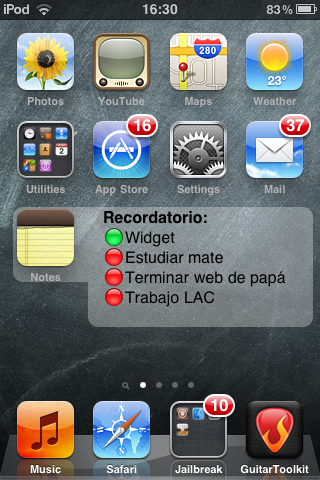
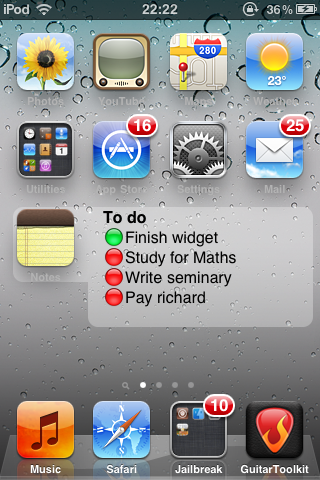
Forget about editing HTML files to display notes on your springboard. Now you can edit the content of your springboard text from Notes.app, in a very good looking way! Use it as a task manager, a reminder or anything you want.<br>
You can watch to screenshots to understund what's about.<br><br>
How to use:<br>
1- Install PerPageHTML or PerPageHTML+.<br>
2- Install This Package and apply it using PerPageHTML(/+). <br>
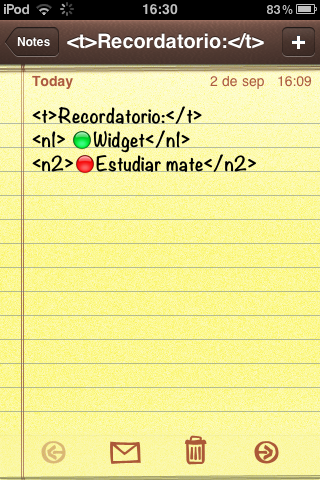
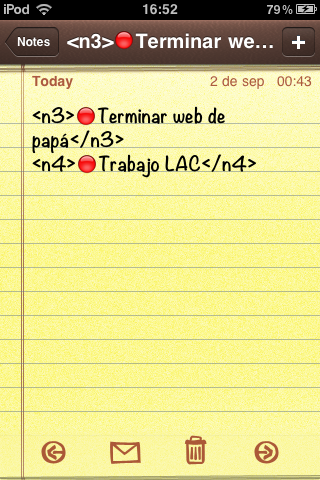
3- Create the new note on notes.app with the format shown on the screenshots. The SBNote title must be inside of <t>Your title here</t>, first line of text on <n1>Your text here</n1>. To write other lines repleace n1 by n2, n3, n4 and n5 on both tags. To finish, just make a respiring and you will see the changes. Additionally you could place the notes icon on the empty place of the widget.<br><br>
IMPORTANT: Because of a minor bug, you should add n3, n4 and n5 lines on a separate note from title, n1 and n2.<br><br>
You can watch a note template example on the screenshots.