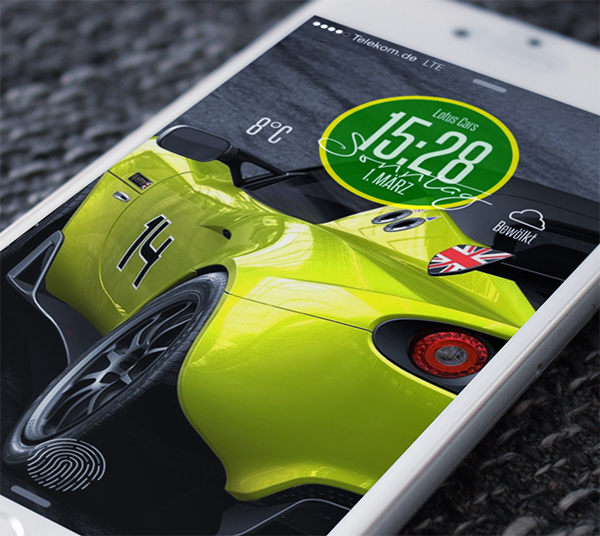
<p class="p1"><span class="s1">Design your own Widget without coding (for both Springboard and Lockscreen) </span></p>
<p class="p1"> </p>
<p class="p1"><span class="s1"><img src="http://fs2.directupload.net/images/150305/wbok4zve.jpg" alt="" width="500" height="447" /></span></p>
<p class="p2"> </p>
<p class="p1"><span class="s1">•Modern clock/date and weather widget</span></p>
<p class="p1"><span class="s1">•Simple setup with a own Widget MENU (no need for iFile and coding ! )</span></p>
<p class="p1"><span class="s1">•Create your own style at this menu: </span></p>
<p class="p1"><span class="s1">- overall size of the widget</span></p>
<p class="p1"><span class="s1">- size of the background graphic</span></p>
<p class="p1"><span class="s1">- shape of the graphic (from round to square)</span></p>
<p class="p1"><span class="s1">- separate colors for graphic and border</span></p>
<p class="p1"><span class="s1">- transparency of the graphic (even invisible)</span></p>
<p class="p1"><span class="s1">- colors of all fonts</span></p>
<p class="p1"><span class="s1">- show or hide seconds, year and location </span></p>
<p class="p1"><span class="s1">- add your own text to the widget</span></p>
<p class="p1"><span class="s1">•12/24 h clock, am/pm, Celsius/Fahrenheit, international or US date </span></p>
<p class="p1"><span class="s1">•8 fully supported languages: <strong>English, Chinese, German, Turkish, Spanish, French, Danish and Italian</strong></span></p>
<p class="p1"><span class="s1">•fading day text animation</span></p>
<p class="p1"><span class="s1">•very small, lightweight and crash proof widget (only 0.5 MB). Everything is coded (except the weather icons)</span></p>
<p class="p2"> </p>
<p class="p1"><span class="s1">Works on all Retina iPhones and all iPads like iPhone 4, 4s, 5, 5c, 5s, 6 and 6 Plus</span></p>
<p class="p2"> </p>
<p class="p1"><span style="text-decoration: underline;"><span class="s1">Needs the tweaks iWidgets for your Springboard and LockHTML4 for your Lockscreen </span></span></p>
<p class="p2"> </p>
<p class="p1"><strong><span class="s1">Setup:</span></strong></p>
<p class="p1"><span class="s1">>Enable or move iWidgets by long-pressing on your display. </span></p>
<p class="p1"><span class="s1">>Enable the Lockscreen widget from Settings/LockHTML4/. Long-press on your lockscreen to move the widget</span></p>
<p class="p1"><span class="s1">>To freely place your app icons use the free tweak Anchor, available at Cydia.</span></p>
<p class="p1"><span class="s1">>To find your Yahoo city code open www.weather.yahoo.com, search for your city and then take a look at the address bar of your browser. The number (6 or 7 digits) at the end is your location code. Don't use ZIP codes or any other codes !</span></p>
<p class="p2"> </p>
<p class="p1"><span class="s1">(c) 2015 by Blue & arthouse, Germany</span></p>