<p style="text-align: center;"><span style="font-family: helvetica; font-size: small;"><strong>Call a Contact from the Lock-screen.</strong></span></p>
<p style="text-align: center;"> </p>
<p style="text-align: center;"><em><span style="font-family: helvetica; font-size: small; color: #ff0000;">Compatible with iPhones running iOS 6, iOS 7</span></em></p>
<p style="text-align: center;"><span style="font-family: helvetica; font-size: small;"> </span></p>
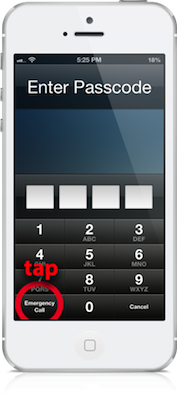
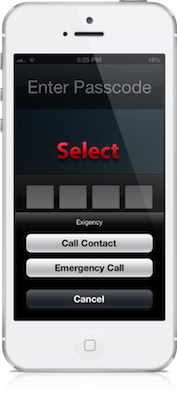
<p style="text-align: center;"><span style="font-family: helvetica; font-size: small;">The emergency-dialer in the iOS Lock-screen is limited to call only emergency numbers, that's where Exigency comes in handy. After installing this tweak, when you will tap on the "Emergency Call" button, it will bring up an action sheet. The action sheet has an option to Call any of your Contacts, right from the Lock-screen. It also has an option to continue to the Emergency Dialer. </span></p>
<p style="text-align: center;"><span style="font-family: helvetica; font-size: small;"> </span></p>
<p style="text-align: center;"><span style="font-family: helvetica; font-size: small;"><em>You can configure from Settings</em></span></p>
<p style="text-align: center;"><span style="font-family: helvetica; font-size: small;"> </span><strong style="font-family: helvetica; font-size: small; line-height: 1.4;"><span style="font-family: helvetica; font-size: small;"> </span></strong></p>